

1. Executive Summary: The Commercial Engine of Enterprise ERP
In any modern business enterprise, every transaction, customer interaction, and delivery milestone ties directly back to revenue generation. Within the SAP Enterprise Resource Planning (ERP) ecosystem, SAP SD (Sales and Distribution) serves as the operational nucleus that executes and monitors this entire commercial pipeline.
From the moment a prospective client submits an initial request for a quotation to the final clearing of funds in accounts receivable, SAP SD orchestrates every operational touchpoint. It bridges consumer-facing front-office requirements with complex back-office supply chain systems, executing real-time pricing, stock verification, logistics routing, legal billing, and statutory tax compliance.
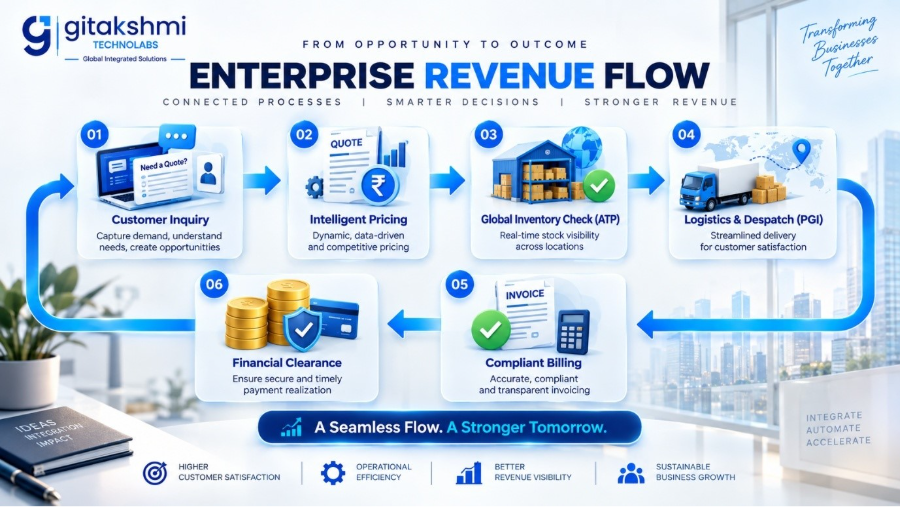
While legacy systems often treat sales, inventory management, and financial accounting as isolated operational silos, SAP SD unifies them into a single, cohesive workflow: Order-to-Cash (O2C). Today, enterprise technology leaders like Gitakshmi Technolabs help modern enterprises modernize this commercial layer. As organizations transition from legacy SAP ECC 6.0 environments to high-performance SAP S/4HANA systems, SAP SD evolves from a mere transactional recording system into an intelligent, data-driven automation platform powered by in-memory computing and modern SAP Fiori applications.
2. Enterprise Structure in SAP SD: The Architectural Blueprint
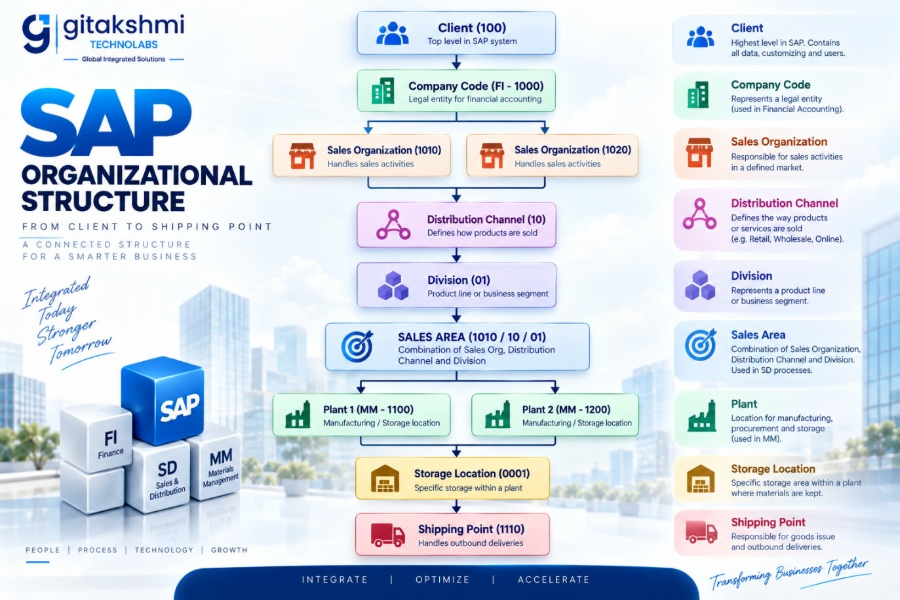
Before any commercial transaction can take place in SAP, an enterprise structure must be configured. This structure maps a company’s physical, legal, and operational reality into the software. A properly designed organizational hierarchy ensures precise financial consolidation, prevents operational bottlenecks, and enables granular reporting.
2.1 The Core Organizational Units
Client
The highest hierarchical level in an SAP instance. Master records, configuration tables, and database schemas configured at the client level apply across all operating entities (e.g., Client 100 for Production).
Company Code (FI)
A self-contained, independent legal accounting entity. Financial statements such as balance sheets, profit-and-loss statements, and statutory tax filings are compiled at this level (e.g., Company Code 1000).
Sales Organization
The legal business unit responsible for distributing goods and services, negotiating regional commercial conditions, and bearing product liability. A single Company Code can have multiple Sales Organizations, but a Sales Organization can belong to only one Company Code.
Distribution Channel
The strategic route or path through which products or services reach end consumers. Typical examples include:
- 10: Wholesale Distribution
- 20: Direct-to-Consumer / Retail
- 30: E-Commerce Platforms
- 40: Institutional / B2B Export
Division
Represents a specific product line, service category, or business segment (e.g., 01: Electronics, 02: Spare Parts, 03: Maintenance Services). It enables segmented profitability analysis and dedicated product-line policies.
The Sales Area (The Core Transactional Unit)
The Sales Area is the combination of:
Key Rule: Master data (including customer records and pricing sheets) and transactional documents (orders, deliveries, invoices) do not exist in a vacuum; they are strictly bound to a single Sales Area. When engineering enterprise blueprints, specialists at Gitakshmi Technolabs recommend keeping Sales Areas lean to prevent unnecessary master data proliferation.
Plant (Logistics / MM)
A manufacturing facility, central warehouse, or regional distribution hub where inventory is stored, manufactured, or issued. A single plant can be assigned to multiple Sales Organizations to enable cross-company and intercompany sales.
Storage Location
The physical subdivision of a plant where stock is maintained at an inventory level (e.g., Raw Materials, Finished Goods, Quarantine/Quality Inspection).
Shipping Point
The dedicated physical dispatch point (loading bay, weighbridge, rail ramp) responsible for picking, packing, and dispatching deliveries. Shipping points are determined at the order item level based on the plant, the loading group of the material, and the shipping conditions of the customer.
3. Core Sub-Modules: The Functional Components of SAP SD
SAP SD is organized into focused sub-modules, each managing a specific part of the commercial operations pipeline:
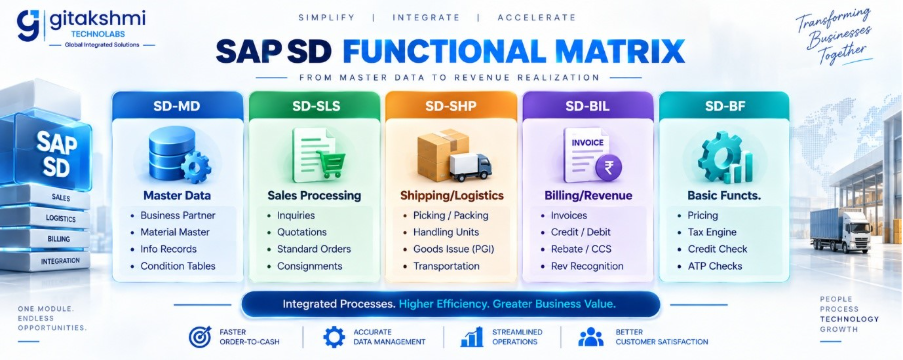
3.1 SD-MD: Master Data
Transactional efficiency depends on high-quality, standardized master data:
- Business Partner (Formerly Customer Master): Consolidates general company identity data, financial company-code postings, and operational sales-area definitions.
- Material Master: Configures operational parameters across Sales Views (delivering plants, tax classifications), Logistics Views (transportation groups, loading units), and Storage Views.
- Customer-Material Information Record (CMIR): Maintains buyer-specific item numbers, dedicated delivering plants, and item-level delivery tolerances.
- Condition Records: Central database tables storing base list prices, volume discount tiers, surcharges, and statutory sales taxes.
3.2 SD-SLS: Sales Order Processing
Handles incoming commercial demand. It converts initial market requests into formal legal contracts, capturing customer purchase orders, requested ship dates, payment terms, and delivery instructions.
3.3 SD-SHP: Shipping and Transportation
Oversees outbound physical fulfillment. It manages outbound delivery documents, batch allocation, serial number tracking, pick-pack execution via Handling Unit Management (HUM), and goods issue validation.
3.4 SD-BIL: Billing and Invoicing
Controls revenue recognition and customer billing. It processes delivery-related and order-related invoices, generates debit/credit notes, clears provisional reserves, and automatically updates the General Ledger (FI-GL).
3.5 SD-BF: Basic Functions
The underlying logic engine that drives automated calculations across the module:
- Pricing Determination: Evaluates price structures and condition sequences.
- Availability Check (ATP): Verifies inventory allocations in real time.
- Credit Management: Validates dynamic buyer risk profiles against credit limits.
- Output Determination: Manages automated communication (EDI, print, email, PDF).
- Material Determination: Manages dynamic item substitutions during supply shortages.
4. End-to-End Order-to-Cash (O2C): A Step-by-Step Walkthrough
The Order-to-Cash (O2C) process defines the journey from customer demand to cash collection. Understanding each stage’s technical inputs, system transactions, and background postings is essential for every functional consultant and business analyst.
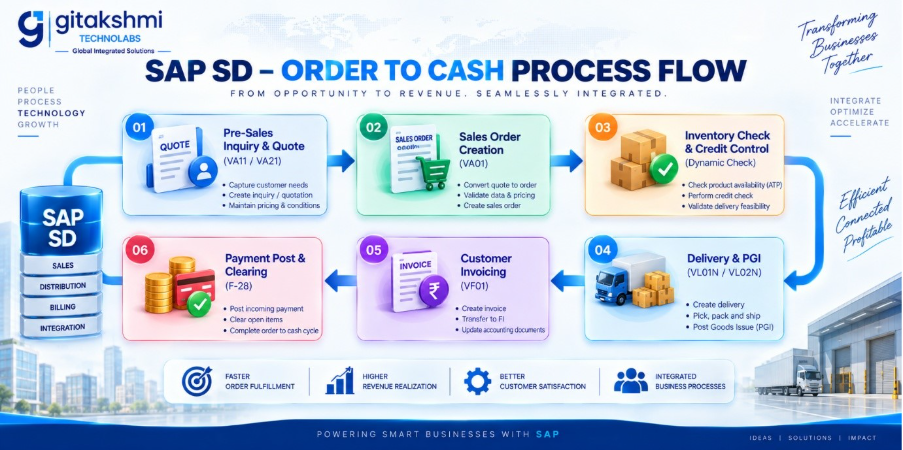
Stage 1: Pre-Sales Activities (Inquiry & Quotation)
- Customer Inquiry (VA11): A legally non-binding document recording a customer’s request for price, delivery, or product feasibility. It captures prospective quantities without reserving inventory or committing delivery dates.
- Quotation Processing (VA21): A legally binding offer provided to the customer. It fixes base pricing, promotional discounts, and delivery dates for a specific validity window.
Stage 2: Sales Order Creation (VA01)
The formal contract created when a customer confirms an order. When an order is saved, the system executes four automated processes in parallel:
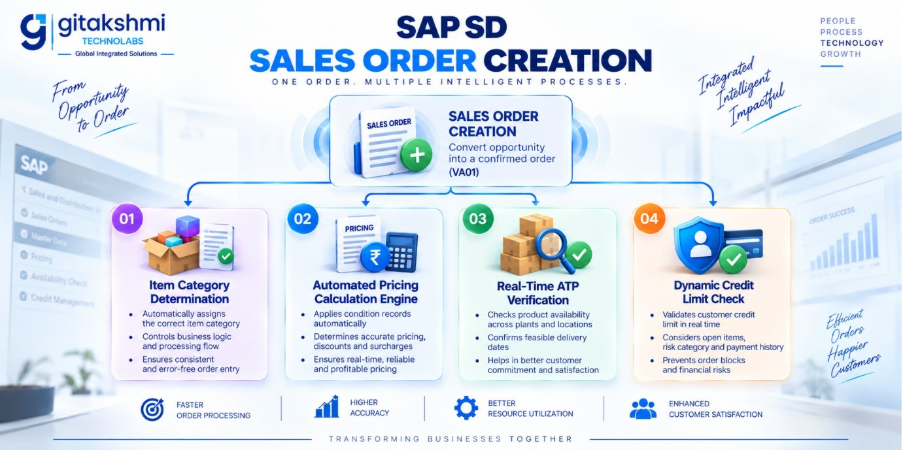
1. Item Category Determination
Determines the operational behavior of each item within the order:
- Example: Standard item (TAN), Text line (TATX), Free of charge item (TANN), Third-party delivery (TAS).
2. Pricing Determination
Executes the Condition Technique to calculate gross prices, freight charges, and applicable tax rates.
3. Real-Time Available-to-Promise (ATP) Check
Evaluates stock on hand, open production orders, and scheduled receipts to confirm reliable delivery dates.
4. Dynamic Credit Limit Check
Evaluates open sales orders, unbilled deliveries, and outstanding receivables against the customer’s approved credit limit. If the threshold is exceeded, the order is blocked from delivery processing.
Stage 3: Outbound Delivery Creation (VL01N)
When the sales order reaches its planned shipping date, an Outbound Delivery document is generated. This document controls the operational fulfillment workflow within the shipping point:
- Route Determination: Calculates transit duration, transport modes, and scheduled drop-offs.
- Picking (VL02N): Generates picking lists or triggers Warehouse Management (WM/EWM) transfer orders to move physical inventory to staging bays.
- Packing: Groups materials into Handling Units (boxes, pallets, containers) with unique SSCC barcoding.
Stage 4: Post Goods Issue – PGI (VL02N)
Post Goods Issue is the operational handover point where ownership of goods officially transfers. Triggering PGI executes two simultaneous real-time actions:
- Material Accounting: Physical inventory quantities decrease in SAP MM.
- Financial Accounting: An automatic accounting entry is generated in General Ledger (FI-GL):
Stage 5: Customer Billing & Invoicing (VF01)
Invoicing is generated using billing due lists referencing preceding delivery documents or milestone order schedules. This stage completes the sales workflow and establishes financial receivables:
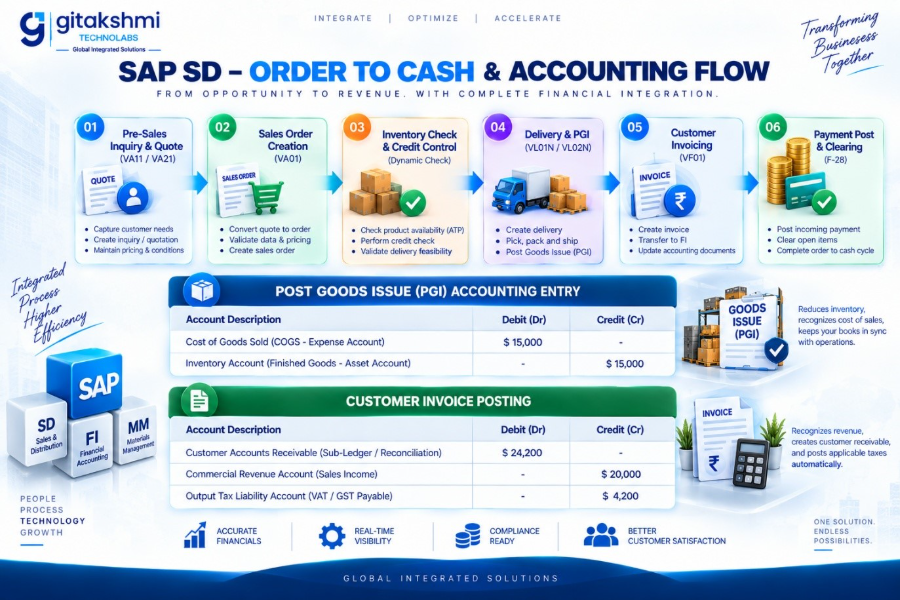
Stage 6: Cash Application and Clearing (F-28)
The workflow concludes in Financial Accounting (FI). As the client completes payment via direct transfer, wire, or check, the finance team posts the receipt, clearing open customer balances against the company bank account:
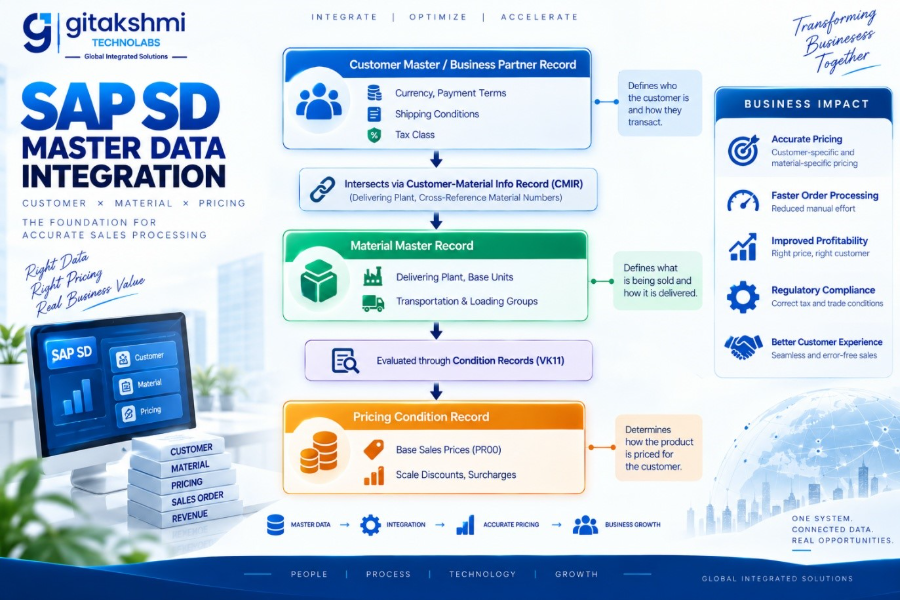
5. Master Data Integration: The Operational Backbone
A robust SAP SD deployment relies on tightly integrated master data records across functional domains.
5.1 Business Partner (BP) Architecture
In modern SAP instances, individual customer and vendor master files are replaced by the unified Business Partner (BP) model. A single corporate entity maintains a common operational record with role-specific views:
- General Role (000000): Core corporate identification, tax registry IDs, address records, and banking coordinates.
- FI Customer Role (FLCU00): Company Code financial attributes, reconciliation accounts, dunning profiles, and credit payment terms.
- SD Customer Role (FLCU01): Sales Area operational parameters, invoicing currency, delivering plant assignments, freight delivery terms (Incoterms), and shipping priority flags.
5.2 Material Master Architecture for Sales
Specific functional views in the Material Master configure sales and distribution behavior:
- Sales: Sales Org Data 1: Base unit of measure, delivering plant assignments, and tax liability indicators.
- Sales: Sales Org Data 2: Item category group assignments (e.g., NORM, DIEN, BANC), material grouping codes, and rebate entitlement toggles.
- Sales: General / Plant: Handling guidelines, transportation groupings, loading methods, and batch management rules.
5.3 Customer-Material Information Record (CMIR)
Maintained via transaction VD51, the CMIR stores customer-specific material information. It takes precedence over general material master defaults during order entry:
- Customer-specific product identification numbers.
- Dedicated shipping plant assignments for specific client facilities.
- Target delivery tolerances (under-delivery and over-delivery thresholds).
- Default partial delivery allowances and shipping limits.
6. The Heart of SD: The Pricing Procedure and Condition Technique
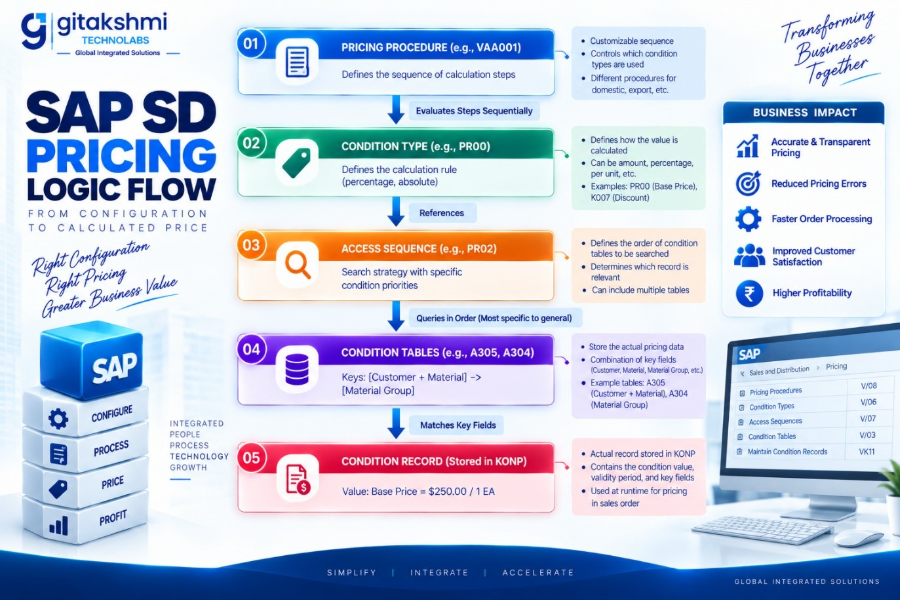
The Condition Technique is the calculation engine of SAP SD. It automatically calculates base prices, surcharges, volume breaks, partner commissions, and statutory sales taxes.
6.1 The Mechanics of the Condition Technique
Step 1: Pricing Procedure ──► Reads sequential condition rules
Step 2: Condition Type ──► Identifies the pricing element
Step 3: Access Sequence ──► Executes the search hierarchy
Step 4: Condition Tables ──► Searches database keys (most specific to general)
Step 5: Condition Record ──► Returns pricing value, discounts, and scales
- Pricing Procedure: The master framework containing the ordered sequence of calculation rules (e.g., Standard Procedure RVAA01).
- Condition Type: Represents a specific pricing component (e.g., PR00 for Base Gross Price, K004 for Material Discount, KF00 for Freight, MWST for Sales Tax).
- Access Sequence: The search strategy assigned to a Condition Type. It directs the system where to look first, querying condition tables from the most specific combination to the most general.
- Condition Table: A database table containing specific key combinations (e.g., Table 005: Sales Org + Distribution Channel + Customer + Material).
- Condition Record: The master data record storing the actual price, discount percentage, currency, validity dates, and scale tiers (managed via transaction VK11).
6.2 Sample Pricing Procedure Configuration
| Step | Counter | Condition Type | Description | From | To | Manual | Required | Stat | Subtotal | Account Key | Accrual Key | |
| 10 | 0 | PR00 | Base Gross Price | – | – | – | Yes | – | Yes | – | ERL | – |
| 20 | 0 | K004 | Material Discount | 10 | – | – | – | – | Yes | – | ERS | – |
| 30 | 0 | K007 | Customer Discount | 10 | – | – | – | – | Yes | – | ERS | – |
| 100 | 0 | – | Net Value 1 | 10 | 30 | – | – | Yes | – | 1 | – | – |
| 110 | 0 | KF00 | Freight Surcharge | – | – | – | – | – | Yes | – | ERF | – |
| 200 | 0 | MWST | Output Sales Tax | 100 | 110 | – | Yes | – | Yes | – | MWS | – |
| 900 | 0 | – | Total Payable | 100 | 200 | – | – | Yes | Yes | – | – | – |
7. Deep Cross-Module Integrations
SAP SD does not operate in isolation. Its strength lies in automated, real-time integration across the wider SAP enterprise suite.
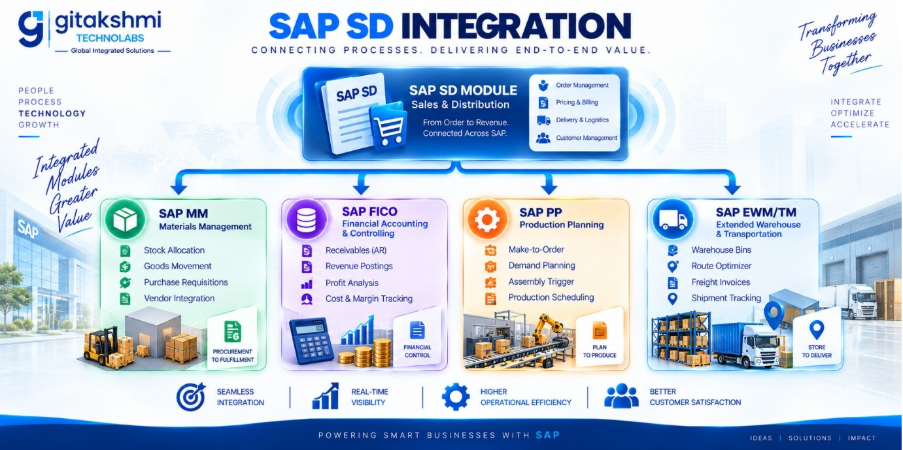
7.1 SD/MM (Materials Management)
- Stock Allocation: Delivery creation initiates reservation requests against inventory managed by MM.
- Goods Movement Tracking: Executing Post Goods Issue (PGI) triggers movement type 601, reducing physical plant and storage location stock counts.
- Third-Party Processing: Entering an order for third-party fulfillment (Item Category TAS) automatically generates a Purchase Requisition (EBAN) in MM to procure materials directly from an external supplier for delivery to the customer.
7.2 SD /FICO (Financial Accounting & Controlling)
- Accounts Receivable: Customer invoices post directly to sub-ledger accounts, updating parent balance sheet accounts via configured Reconciliation Accounts.
- Revenue Recognition: Postings route directly through Account Keys (ERL, ERS) mapped to specific General Ledger revenue and discount accounts (VKOA).
- Profitability Analysis (CO-PA): Invoiced line items transfer characteristic values (Sales Rep, Territory, Customer Group, Brand) to profitability segments, allowing real-time margin analysis.
7.3 SD / PP (Production Planning)
- Make-to-Order (MTO): Saving a sales order for customized products generates planned production orders in PP to start manufacturing.
- Demand Management: Standard stock sales orders update planned independent requirements (PIR), dynamically adjusting master production schedules.
7.4 SD / EWM / TM (Extended Warehouse & Transportation Management)
- EWM Warehouse Bins: Outbound deliveries replicate to SAP EWM as delivery requests, managing complex warehouse wave picking, packing, and automated conveyor routing.
- TM Freight Integration: Delivery requirements consolidate into Transportation Cockpits, optimizing container fill rates, selecting multi-modal carriers, and automating shipping cost calculations.
8. What Changed? SAP ECC 6.0 SD vs. SAP S/4HANA Sales
The transition from SAP ECC to SAP S/4HANA marks a major shift in sales architecture. S/4HANA eliminates legacy data redundancies, replaces batch processes with real-time analytics, and updates the user interface with modern Fiori applications.
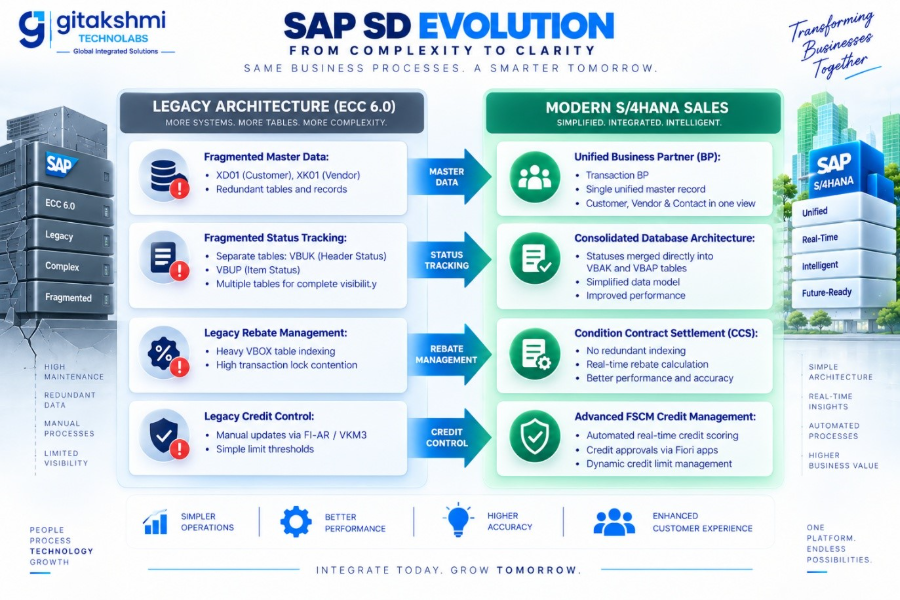
Detailed Structural Comparison
| Functional Area | SAP ECC 6.0 Architecture | Modern SAP S/4HANA Sales |
| Customer Master Data | Managed through separate transactions: XD01, VD01, XK01. | Unified under transaction BP via Customer-Vendor Integration (CVI). |
| Status Architecture | Header and item statuses stored in separate tables (VBUK, VBUP). | VBUK and VBUP eliminated; status fields are stored directly in VBAK and VBAP. |
| Availability Checks | Standard Available-to-Promise (ATP) evaluating current inventory records. | Advanced ATP (aATP): Adds Product Allocation, Alternative Plant Confirmation (ABC), and Backorder Processing (BOP). |
| Credit Management | Legacy credit control via FI-AR, monitored using transaction VKM3. | FSCM Credit Management (FIN-FSCM-CR): Features automated credit risk scoring and credit agency integration. |
| Rebates Processing | Legacy rebates updating the high-volume index table VBOX. | Condition Contract Settlement (CCS): Managed through Settlement Management without table indexing locks. |
| Output Determination | Legacy condition tables using the NAST message control system. | BRF+ (Business Rules Framework Plus): Configures modern document output via PDF, email, and API channels. |
| Data Footprint | Complex data models with redundant document indices (e.g., VAKKEY, VAPKEY). | Streamlined transactional tables operating on in-memory columnar storage. |
| User Experience | Traditional SAP GUI desktop transactions. | Role-based SAP Fiori Apps (e.g., Sales Order Fulfillment Cockpit). |
For organizations planning this transition, partnering with an experienced digital solutions firm like Gitakshmi Technolabs ensures clean data harmonization, zero downtime during Cutover, and seamless Customer-Vendor Integration (CVI) configuration.
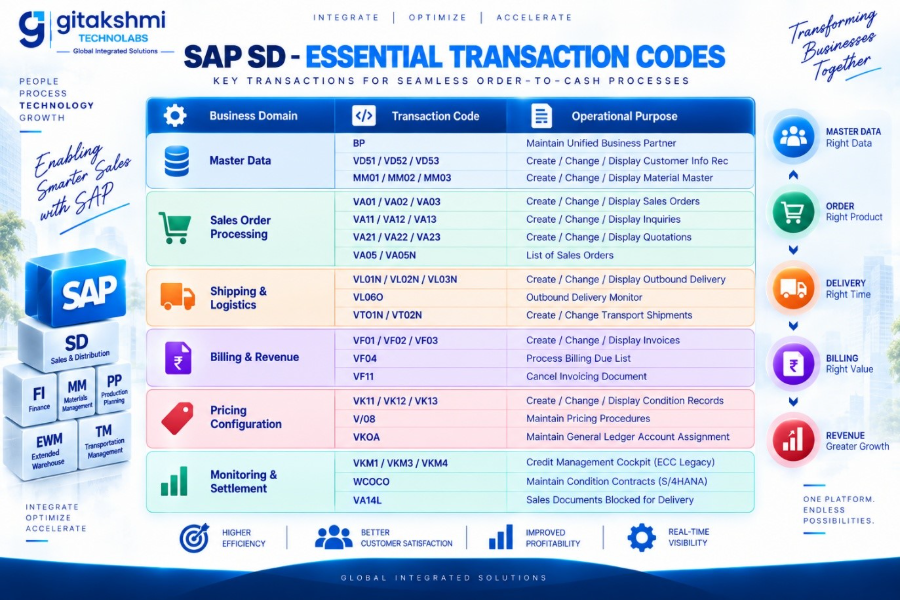
9. Essential Master Transaction Codes (Cheat Sheet)
A consolidated quick-reference guide of transaction codes used across configuration and daily operations:
10. Real-World Troubleshooting & Error Resolution
During implementation and daily operations, functional consultants encounter recurring system errors. Here are four of the most common issues along with their root causes and standard solutions:
Scenario 1: Missing Mandatory Condition – Base Price PR00 Missing
- Symptom: The order displays error: Pricing error: Mandatory condition PR00 is missing (Message V1 801).
- Root Cause: The pricing procedure mandates condition PR00, but the system found no valid condition record for the sales parameters, customer tier, or material group.
- Resolution:
- Open transaction VA02, navigate to item conditions, and select the Condition Analysis tool to review the search sequence.
- Verify the specific key combination where the search failed.
- Open transaction VK11, enter condition type PR00, and create a valid pricing record for the relevant Sales Area, Customer, and Material.
Scenario 2: Delivery Creation Blocked by Credit Limit Check
- Symptom: The system prevents delivery creation with error: Order blocked for delivery due to credit check failure.
- Root Cause: The customer’s open orders, unbilled deliveries, and outstanding receivables exceed their approved credit limit.
- Resolution:
- Open the Credit Management Cockpit (transaction VKM3 in ECC, or the Manage Credit Cases Fiori app in S/4HANA).
- Evaluate payment history, current exposures, and open dispute cases.
- If authorized, release the credit block or coordinate with the finance team to process overdue receivables via transaction F-28.
Scenario 3: Revenue Account Determination Failure During Billing Release
- Symptom: Saving an invoice generates error: Account determination for table 001, key V, 0001, ERL does not exist (Message F5 351). The billing document saves but is blocked from releasing to accounting.
- Root Cause: The system cannot map the invoice line item’s revenue account key (ERL) to a valid General Ledger account.
- Resolution:
- Open transaction VKOA to access revenue account configuration.
- Check the relevant account determination table (e.g., Cust.Group/Material.Group/Account Key).
- Configure the missing General Ledger revenue account for the application’s Chart of Accounts, Sales Organization, and Account Key assignment.
- Open the billing document in VF02 and select Release to Accounting to complete the posting.
Scenario 4: Item Category Determination Failure
- Symptom: Entering a material generates error: Item category cannot be determined (Message V1 320).
- Root Cause: Missing configuration linking the Sales Document Type, the material’s Item Category Group, and the item’s operational usage.
- Resolution:
- Check the material master record via MM03 under the Sales: Sales Org 2 view to confirm its assigned Item Category Group (e.g., NORM).
- Open transaction VOV4 in configuration.
- Add the missing assignment row mapping the Document Type (e.g., OR), the Item Category Group (e.g., NORM), and default usage to the target Item Category (e.g., TAN).
11. Frequently Asked Questions (FAQ)
Q3: Why were database tables VBUK and VBUP eliminated in SAP S/4HANA?
In SAP ECC, status tracking required separate document status tables: VBUK for header statuses and VBUP for item statuses. This separation caused performance bottlenecks during high-volume document updates due to database locking. In SAP S/4HANA, the in-memory computing architecture allows status fields to be stored directly within the primary document tables: VBAK for document headers and VBAP for item lines.
Q2: How does SAP handle partial deliveries and delivery tolerances?
Partial delivery behavior is configured within the customer master record, the Customer-Material Info Record (CMIR), and the sales order item:
Users can set maximum partial delivery allowances (e.g., a maximum of 3 shipments).
A complete delivery indicator can be set to require shipments to be delivered in full.
Over-delivery and under-delivery percentage thresholds define the range of acceptable variance before warnings or delivery blocks are triggered.
Q3: Why were database tables VBUK and VBUP eliminated in SAP S/4HANA?
In SAP ECC, status tracking required separate document status tables: VBUK for header statuses and VBUP for item statuses. This separation caused performance bottlenecks during high-volume document updates due to database locking. In SAP S/4HANA, the in-memory computing architecture allows status fields to be stored directly within the primary document tables: VBAK for document headers and VBAP for item lines.
Q4: What is the difference between standard ATP and Advanced ATP (aATP) in S/4HANA?
Standard ATP evaluates current stock balances against planned receipts and issues. Advanced ATP (aATP) in SAP S/4HANA adds advanced allocation and fulfillment features:
Product Allocation (PAL): Protects stock allocations for strategic customer segments during supply shortages.
Alternative-Based Confirmation (ABC): Automatically confirms orders using alternative plants, warehouses, or substitute materials.
Backorder Processing (BOP): Dynamically redistributes inventory based on configurable prioritization rules (Win, Gain, Redistribute, Fill, Lose).
Q5: Can an SAP SD Sales Order exist without a Material Master record?
Yes. Text items (Item Category TATX) and non-stock service orders can be processed without a physical material master record. In these cases, pricing is entered manually or determined via condition records using pricing hierarchies, and outbound delivery processing is bypassed.
12. Summary & Implementation Checklist
A successful SAP SD rollout requires balanced alignment across organizational structure, clean master data, and tested pricing models:
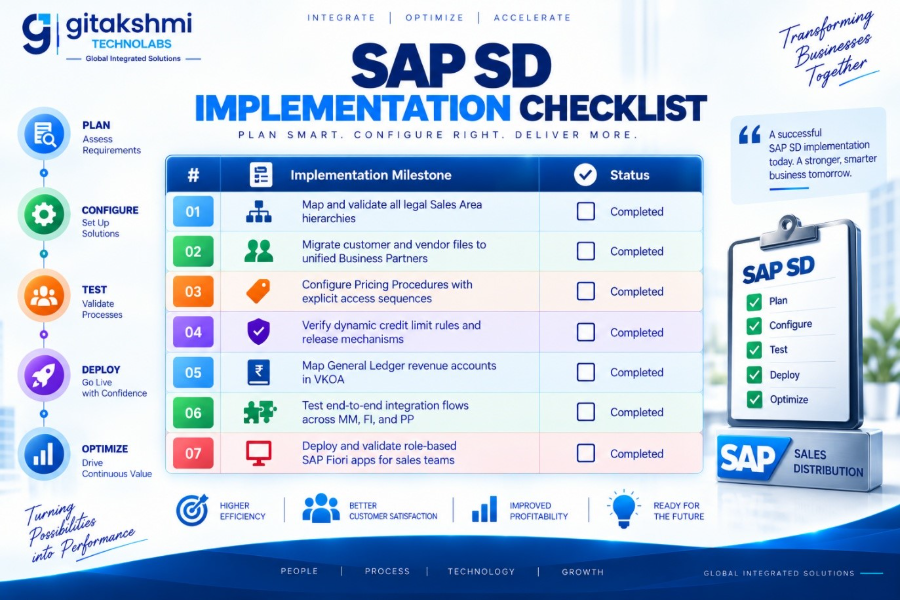
By following this architectural framework, organizations can build a stable, scalable SAP SD implementation that streamlines sales fulfillment, protects commercial margins, and adapts to future supply chain requirements.
Accelerate Your SAP Transformation with Gitakshmi Technolabs
Whether you are implementing an end-to-end Order-to-Cash cycle, optimizing complex pricing procedures, or executing a seamless ECC to SAP S/4HANA Sales migration, Gitakshmi Technolabs brings the functional depth and technical rigor your business demands. Contact the enterprise ERP consulting team at Gitakshmi Technolabs today to discover how custom digital architectures can unlock your commercial potential.