
What is SAP MM? The Complete Guide to Purchasing, Inventory Management & S/4HANA Sourcing
In any manufacturing facility, retail enterprise, infrastructure giant, or FMCG company, managing raw materials and vendor workflows seamlessly is the absolute foundation of profitability. If production lines halt due to missing components, or if excess warehouse inventory blocks working capital, operational margins collapse immediately.
This is where SAP Materials Management (SAP MM)—re-engineered as Sourcing and Procurement in SAP S/4HANA—serves as the mission-critical digital backbone. It centralizes and automates every single phase of an enterprise supply chain: from internal requirement requisitioning and supplier bidding to physical warehouse inventory management and final accounts payable clearance.
While most online tutorials provide superficial overviews or standard syllabus listings, enterprise deployment requires practical configuration depth. Developed in collaboration with the corporate enterprise architects and ERP trainers at Gitakshmi Technolabs, this comprehensive technical blueprint covers organizational structure design, master data governance, the complete Procure-to-Pay (P2P) lifecycle, SPRO implementation parameters, OBYC automatic account determination, daily production troubleshooting, and modern S/4HANA architecture shifts.
1. Enterprise Organizational Hierarchy: Architecture Setup
Before posting a single material document or issuing a commercial purchase order, an organization’s legal, corporate, and physical operating footprint must be defined in the ERP landscape. In SAP MM, this mapping is established via the SPRO (SAP Project Reference Object) configuration framework.
The Six Foundational Organizational Units
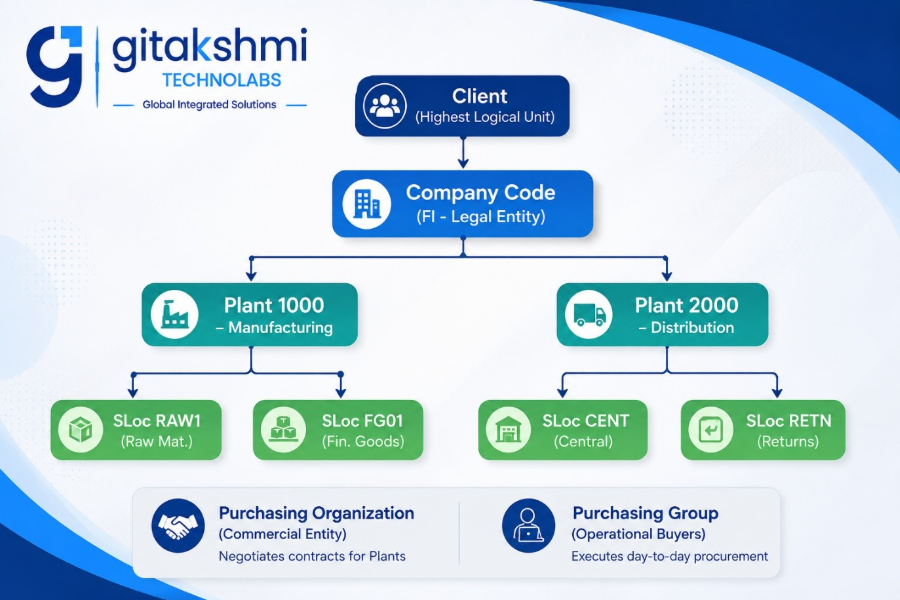
- Client: The supreme organizational layer within an SAP system instance. Corporate governance frameworks, global authorization profiles, cross-company parameters, and international currency exchange tables maintained at the client level apply uniformly across all sub-entities.
- Company Code: The primary legal accounting unit in Financial Accounting (FI). It represents an independent legal corporate structure capable of producing statutory balance sheets and profit & loss (P&L) statements for tax authorities and board governance. A single SAP client easily supports multiple Company Codes.
- Plant: A physical, manufacturing, or distribution logistics location where stock is processed, manufactured, staged, maintained, or dispatched to distribution channels. While a plant is strictly assigned to one Company Code, a single Company Code can oversee dozens of diverse plants.
- Storage Location (SLoc): A dedicated subdivision within a plant designated for segregating materials based on physical location, staging requirements, or inventory conditions (e.g., RAW1 for raw inputs, SFG1 for semi-finished goods, FG01 for finished inventory, SPAR for maintenance spares, and BLCK for damaged or blocked lots).
- Purchasing Organization: The legally designated procurement entity authorized to negotiate framework contracts, commercial delivery terms, and vendor price conditions for one or more physical plants.
- Centralized Purchasing Organization: A single purchasing body that negotiates collective contracts for multiple company codes or group plants to secure bulk-purchase volume discounts.
- Plant-Specific Purchasing Organization: Dedicated procurement units set up specifically to cater to local plant purchases, domestic compliance, and regional vendor bases.
- Purchasing Group: Operational buyers or internal procurement executives directly responsible for tracking day-to-day purchase requisitions, floating RFQs, evaluating commercial quotations, and dispatching Purchase Orders.
2. Step-by-Step SPRO Enterprise Configuration Path
In real-world enterprise implementation projects—such as the real-time client systems deployed by Gitakshmi Technolabs—functional consultants configure this baseline organizational hierarchy using standard transaction codes and SPRO paths:
| Step | Configuration Milestone | Standard SPRO Navigation Path | Key T-Code |
| 1 | Define Plant | Enterprise Structure > Definition > Logistics – General > Define, copy, delete, check plant | OX10 |
| 2 | Define Storage Location | Enterprise Structure > Definition > Materials Management > Maintain storage location | OX09 |
| 3 | Define Purchasing Organization | Enterprise Structure > Definition > Materials Management > Maintain purchasing organization | OX15 / SPRO |
| 4 | Assign Plant to Company Code | Enterprise Structure > Assignment > Logistics – General > Assign plant to company code | OX18 |
| 5 | Assign Purchasing Org to CoCode | Enterprise Structure > Assignment > Materials Management > Assign purchasing organization to company code | OX01 |
| 6 | Assign Purchasing Org to Plant | Enterprise Structure > Assignment > Materials Management > Assign purchasing organization to plant | OX17 |
| 7 | Assign Standard Purchasing Org | Enterprise Structure > Assignment > Materials Management > Assign standard purchasing organization to plant | OMKI |
3. The Core Master Data Engine of SAP MM
Transactional integrity depends completely on master data accuracy. If master data parameters contain discrepancies, every downstream process—from MRP runs to warehouse receipts and invoice matching—will fail.
Material Master (MM01 / MM02 / MM03)
The Material Master is the central repository containing operational, engineering, and financial definitions of every item handled by the business. It is organized into functional views:
- Basic Data 1 & 2: Universal client-wide attributes including technical item descriptions, base unit of measure (UoM), gross and net weights, material groups, and global bar codes (EAN/UPC).
- Purchasing View: Plant-specific attributes such as purchasing group assignment, order unit conversion, automatic purchase order indicators, mandatory source list flags, and supplier lead times.
- MRP Views (1 to 4): Deterministic planning parameters. Captures MRP types (e.g., PD for standard MRP, VB for manual reorder planning), lot-sizing keys (e.g., EX exact sizing, FX fixed lot sizes), reorder points, safety stock minimums, and procurement types (E in-house production, F external procurement).
- Plant Data / Storage Views: Shelf-life tracking, temperature-control requirements, storage bin allocations, and hazardous chemical compliance parameters.
- Accounting Views 1 & 2: Bridges the physical material directly to the financial general ledger. Defines the Valuation Class (which maps to Chart of Accounts via OBYC), Price Control indicators (V for Moving Average Price or S for Standard Price), current moving price, standard cost, and cumulative stock inventory valuation.
Business Partner / Vendor Master (BP in S/4HANA / XK01 in ECC)
Maintains commercial, corporate, and statutory parameters for external suppliers:
- General Data (Client Level): Registered legal corporate name, registered address, direct contact info, GSTIN/PAN identification, bank accounts, and compliance documentation.
- Company Code Data (FI Level): Reconciliation Account (Accounts Payable balance sheet GL code), agreed payment terms (e.g., Net 30, Net 60), payment methods (NEFT, RTGS, Wire), dunning procedures, and withholding tax (TDS) parameters.
- Purchasing Data (Purchasing Org Level): Default purchase currency, Incoterms (e.g., FOB, CIF, EXW), partner roles/functions (VN Vendor, PI Invoicing Party, OA Ordering Address, GS Goods Supplier), order minimums, and GR-based invoice validation flags.
Purchasing Info Record – PIR (ME11 / ME12 / ME13)
Maintains the unique commercial terms between a specific vendor and a specific material:
- Pre-negotiated net unit purchase prices, quantity-dependent pricing scales, and condition types.
- Planned delivery time (in calendar days), minimum production run quantities, and standard batch delivery limits.
- Overdelivery and underdelivery tolerance thresholds.
- Categorized across four distinct operational info types: Standard, Subcontracting, Consignment, and Pipeline.
Source List (ME01 / ME03 / ME04)
The administrative gatekeeper for plant sourcing:
- Designates valid supply channels for specific materials within explicit date ranges.
- Marks verified top suppliers as Fixed, allowing automated MRP runs to assign planned purchase requisitions directly without buyer intervention.
- Sets substandard or non-compliant suppliers as Blocked, automatically restricting buyers from issuing RFQs or Purchase Orders.
4. The End-to-End Procure-to-Pay (P2P) Lifecycle
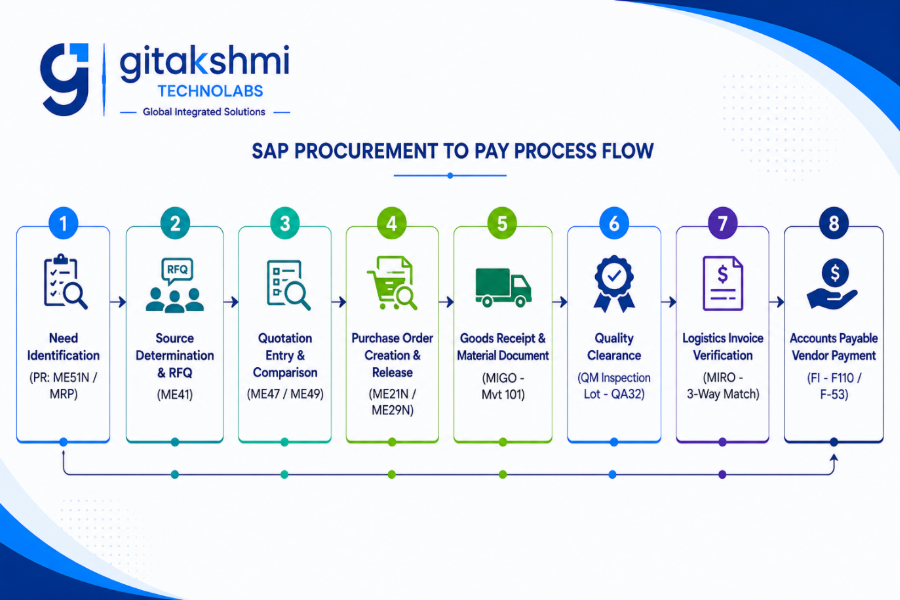
The Procure-to-Pay (P2P) cycle is the fundamental workflow running daily operations across supply chains. At Gitakshmi Technolabs, students and corporate trainees implement this end-to-end 8-step cycle on real-time server environments:
Phase 1: Requirement Determination (Purchase Requisition – PR)
Every procurement begins with demand. This occurs either manually—such as an engineering manager creating a requisition for mechanical equipment via ME51N—or through automated Material Requirements Planning (MRP Live via MD01N), which monitors inventory deficits against configured safety stocks and auto-schedules Purchase Requisitions.
Phase 2: Source Determination & Request for Quotation (RFQ)
When an existing contract or catalog price is not present, procurement teams initiate an open sourcing event. Via transaction ME41, buyers publish an RFQ linked directly to the PR line items, detailing precise technical tolerances, target volumes, and delivery deadlines.
Phase 3: Quotation Maintenance & Commercial Evaluation
Vendors return binding commercial quotes including base item costs, packing fees, transportation freight charges, and GST rates.
- Buyers record quote details in the system using transaction ME47.
- Buyers then execute transaction ME49 (Price Comparison List). The system balances all landing cost parameters, payment terms, and delivery freight rates to generate an objective side-by-side comparison, highlighting the lowest-cost compliant supplier (L1 bidder).
Phase 4: Purchase Order Execution & Release Strategy
Following vendor selection, the buyer issues a legally binding commercial Purchase Order using transaction ME21N. The PO captures essential transaction details:
- Header: Vendor code, currency, payment terms, purchasing organization, purchasing group, and international Incoterms.
- Item Overview: Material code, ordered quantity, delivery date, net price, target plant, and target storage location.
- Item Detail: Account assignment category (Blank for standard warehouse inventory, K for cost center consumption, P for project/WBS elements), tax codes, and delivery tolerance limits.
To safeguard corporate financial governance, the PO automatically triggers a multi-tier Release Strategy (approval workflow). Based on monetary value limits and plant codes, designated authorities review and sign off using transaction ME29N (individual release) or ME28 (collective release).
Phase 5: Goods Receipt Processing (GR via MIGO)
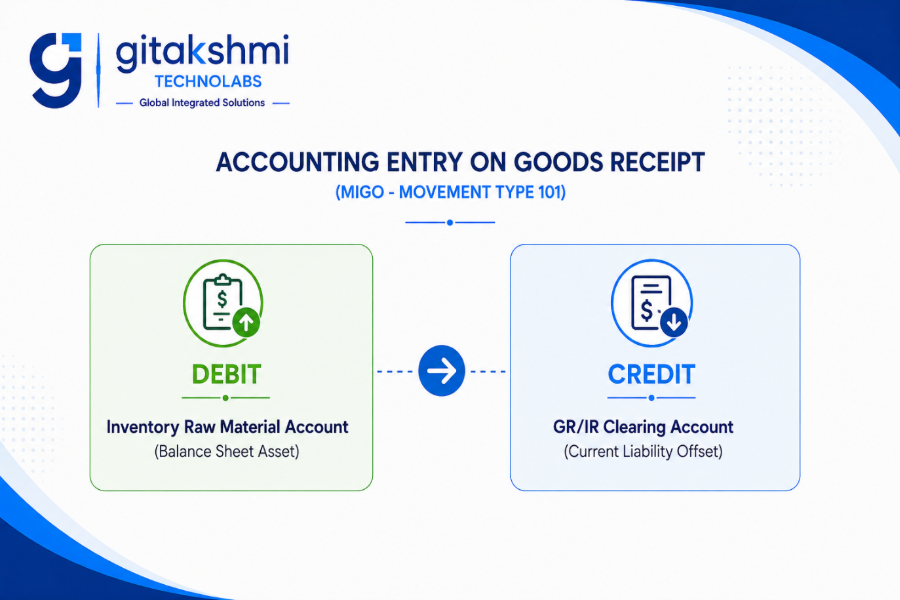
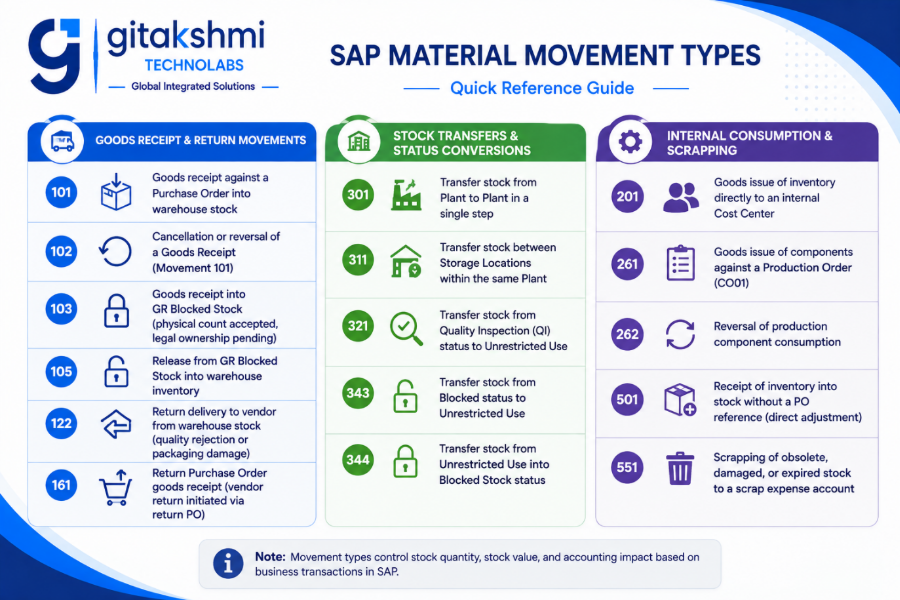
When the vendor’s logistics carrier arrives at the factory gate, storekeepers inspect physical package counts against the shipping delivery challan. They record the intake in transaction MIGO referencing the PO number under Movement Type 101.
Posting this Goods Receipt generates two simultaneous documents:
- Material Document: Updates physical inventory ledgers in real time, increasing on-hand stock counts at the assigned storage location.
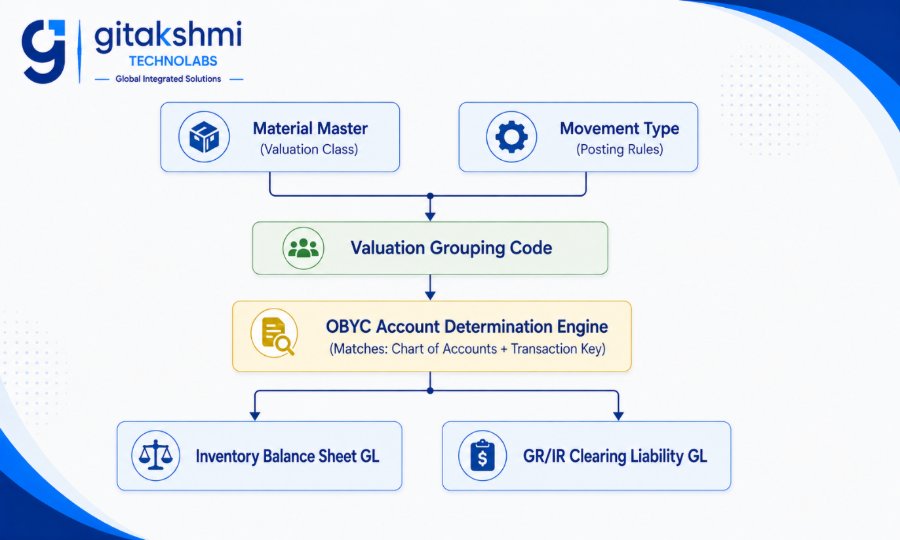
- Accounting Document: Automatically balances the financial ledger via predefined account determination:
Phase 6: Quality Inspection (QM Integration)
When Quality Management parameters are active, incoming stock does not route directly to Unrestricted Use stock. It is automatically placed into Quality Inspection Stock (QI), generating an internal inspection lot. Quality assurance technicians run lab assays, record values, and execute a Usage Decision (UD) via transaction QA32. On QA acceptance, stock automatically transfers to Unrestricted Stock via Movement Type 321.
Phase 7: Logistics Invoice Verification (LIV via MIRO)
The Accounts Payable division processes the supplier’s commercial tax invoice using transaction MIRO. The ERP engine performs an automated 3-Way Match:
- Purchase Order: Checks approved rates, contracted terms, and tax codes.
- Goods Receipt (MIGO): Verifies the physical quantity accepted at the gate.
- Vendor Invoice (MIRO): Validates the invoiced quantity, unit price, and total taxes claimed.
If discrepancies exceed configured tolerance limits, the invoice posts with an automated payment block (R – Invoice Verification Block). On successful clearance, the temporary clearing account clears out:
Phase 8: Accounts Payable Settlement (FI Clearing)
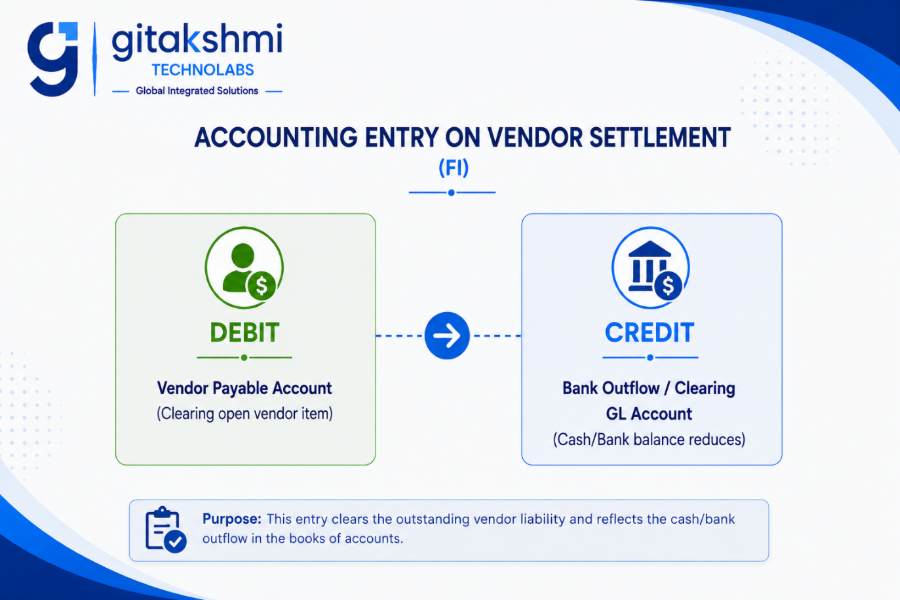
The finance department clears the vendor’s open liability. This is executed either manually using transaction F-53 (Post Outgoing Payments) or via an automated mass electronic payment run using transaction F110 (Automatic Payment Program – APP).
5. Material Valuation & The OBYC Account Determination Engine
A major operational advantage of SAP ERP is that warehouse operators never have to manually enter debit and credit general ledger codes during material movements. The integration between Materials Management and Financial Accounting (FI) is handled by the Automatic Account Determination engine, configured in transaction OBYC.
Key Functional Components of OBYC
- Chart of Accounts: The structured list of general ledger accounts used across the legal Company Code.
- Valuation Grouping Code: Assigned via transaction OMWD, this groups multiple physical plants sharing identical accounting rules into a single valuation code, eliminating redundant account mapping.
- Valuation Class: Configured in the Accounting View of the Material Master. It groups materials with similar financial behaviors and links them to specific balance sheet accounts (e.g., 3000 for Raw Materials, 3100 for Trading Goods, 7920 for Finished Products).
- Transaction Keys (System Posting Rules): Predefined system drivers that govern which specific general ledger accounts are updated during transactions:
- BSX (Inventory Posting): Triggers whenever physical inventory valuation balances increase or decrease.
- WRX (GR/IR Clearing): Acts as the temporary clearing liability account between goods intake (MIGO) and commercial billing (MIRO).
- PRD (Price Differences): Captures financial variances between the purchase order price and the standard cost whenever Standard Price (S) control is enforced.
- GBB (Offsetting Entry for Stock Posting): Determines offsetting accounts for internal scrap (551), initial inventory entry (501), or cost center issues (201). GBB uses Account Modification Keys (such as VBR for internal consumption and VNG for scrapping adjustments).
6. Special Procurement Processes in SAP MM
Beyond basic spot purchases, enterprise supply chains rely on specialized procurement models. At Gitakshmi Technolabs, corporate learners receive dedicated hands-on scenarios across all these variations:
| Procurement Model | Business Description | Critical Movement Types | Special Configuration / Stock Indicators |
| Vendor Consignment | Vendor keeps their stock inside your warehouse. Ownership remains with the vendor until the material is consumed in production. You pay only for what you consume. | 101 K (Receipt of consignment stock) 411 K (Transfer vendor consignment stock to own stock) | Item Category K in Purchase Order. No invoice posted via MIRO; settled periodically via transaction MRKO. |
| Subcontracting | The parent company provides raw materials or components to an external job-work vendor. The vendor processes them and returns the finished assembly, charging only processing/conversion fees. | 541 (Transfer components to subcontractor stock) 101 (Receive finished product) 543 (Automatic backflush consumption of raw parts) | Item Category L in Purchase Order. The system automatically explodes the component Bill of Materials (BOM) on line item creation. |
| Stock Transport Order (STO) | Moving inventory from one plant to another within the same company code or across different company codes, while maintaining in-transit visibility. | 351 (Issue from supplying plant) 101 (Receipt at receiving plant) 641 (Issue via Sales & Distribution delivery route) | Document Type UB for intra-company stock transfer; Document Type NB with billing integration for cross-company STOs. |
| Third-Party Processing | Your customer places a sales order with you, but you do not stock or ship the item. Instead, you send a PO to an external vendor who delivers directly to the customer’s site. | No physical warehouse movement inside your plant. | Item Category S in Sales Order; triggers an automated PR/PO with Item Category S. Customer billing happens directly via shipping notification. |
| Pipeline Procurement | Continuous utility supplies (such as water, industrial gas, electricity, or piped chemicals) piped directly into the plant without raising individual POs. | 201 P (Consumption directly from pipeline to cost center) | Special Pipeline Info Record setup; liabilities accumulated and settled via transaction MRKO. |
7. Warehouse Inventory Management & Movement Types Reference
Every single physical stock intake, bin transfer, production issue, and scrap operation in SAP is governed by a 3-digit Movement Type. It regulates screen layouts, updates stock registers, and triggers financial postings.
8. Real-World Troubleshooting: Resolving Production Errors
Support consultants in enterprise environments frequently face runtime issues during daily execution. Here is how senior consultants address the most frequent production errors:
Error 1: “Posting only possible in periods YYYY/MM and YYYY/MM in company code XXXX”
- Root Cause: The financial posting period for Materials Management is closed for the target date. This typically occurs on the first working day of a new calendar month.
- Resolution: Run transaction MMPV, specify the target Company Code, and input the new month and fiscal year to advance the MM period. Verify the open operational period using transaction MMRV.
Error 2: “Account determination for table T030K key XXXX WRX not possible”
- Root Cause: The OBYC account determination table lacks an active GL account mapped to Transaction Key WRX (GR/IR Clearing) for the active Chart of Accounts and Valuation Class assigned to the material.
- Resolution: Open transaction OBYC, double-click on Transaction Key WRX, enter the operational Chart of Accounts, and define the missing clearing GL account against the designated Valuation Class.
Error 3: “PU: Purchase order quantity exceeded by X units”
- Root Cause: A storekeeper is attempting to post a Goods Receipt (MIGO) for an incoming volume that exceeds the PO quantity plus the configured overdelivery tolerance percentage.
- Resolution: Check the Delivery tab in the PO line item. If the business permits this excess delivery, adjust the overdelivery tolerance percentage or have the procurement team raise a PO quantity amendment before posting the GR.
Error 4: “Material balance zero, but total value not zero”
- Root Cause: Under Moving Average Pricing (V), fractional rounding differences accumulate over repeated partial receipts and low-value scrap transactions, leaving zero physical stock but a residual currency value.
- Resolution: Execute transaction MR21 (Price Change) to post an offsetting valuation adjustment, or book a write-off against the standard rounding inventory difference GL account.
9. Architectural Shifts: SAP ECC vs. SAP S/4HANA Sourcing & Procurement
Migrating from the legacy ECC environment to SAP S/4HANA introduces major changes to the underlying database architecture, master data models, and user experience:
| Architectural Feature | Classical SAP ECC (R/3 Architecture) | Modern SAP S/4HANA Enterprise |
| Vendor Master Model | Maintained via fragmented transaction codes: XK01 (Central), MK01 (Purchasing), FK01 (Finance). Redundant records created if an entity was both customer and vendor. | Central Business Partner (BP): All suppliers, customers, and banks are maintained under unified BP roles (FLVN00 for FI Vendor, FLVN01 for Purchasing). Eliminates duplicate records. |
| Material Code Length | Restrained to a maximum field length of 18 characters. | Native support for extended material numbers up to 40 characters, eliminating workarounds for complex part numbering. |
| Material Ledger (ML) | Optional deployment. Most mid-sized firms relied solely on standard costing or basic moving averages. | Mandatory Deployment. Real-time multi-currency valuation and parallel accounting active out-of-the-box. |
| Database Aggregates | Fragmented aggregate and history tables (MSEG for line items, MKPF for headers, MARC, MBEW). Prone to database locking during high-volume goods receipts. | Single Source of Truth (MATDOC): A single universal document table stores all material movements. Eliminates database locking and ensures high-speed transactional writes. |
| MRP Processing Speed | Classical batch runs (MD01) scheduled as overnight jobs due to heavy database query overhead. | MRP Live (MD01N): In-memory computing on SAP HANA finishes complex multi-plant planning runs in minutes instead of hours, calculating real-time replenishment requirements on the fly. |
| User Interface (UX) | Clunky SAP GUI screens reliant on memorizing thousands of four-digit transaction codes. | SAP Fiori: Clean, responsive, web-based tiles that adapt seamlessly across desktops, tablets, and smartphones. |
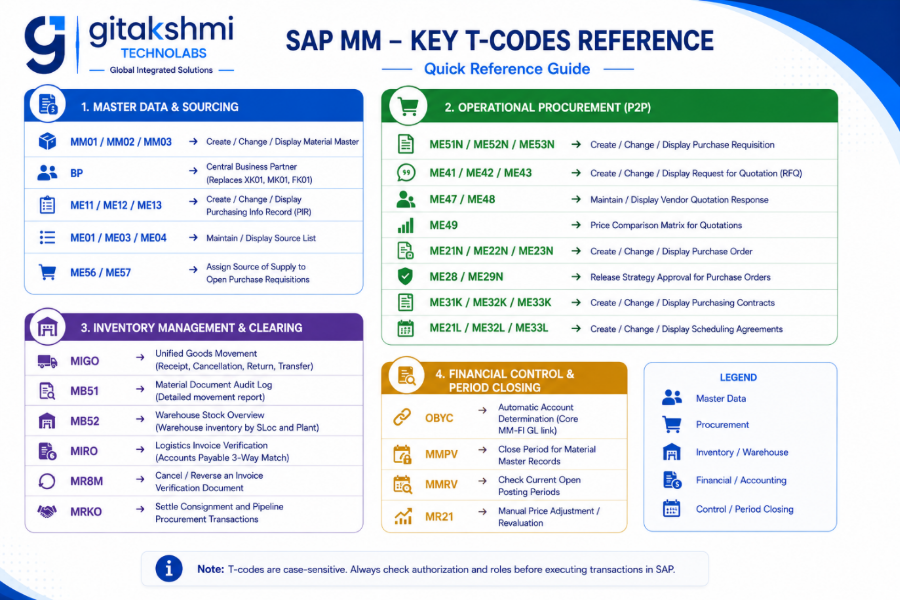
10. Comprehensive SAP MM Transaction Code Cheat Sheet
11. Frequently Asked Questions (Technical & Implementation)
Q1: What is the functional difference between a Purchase Requisition (PR) and a Purchase Order (PO)?
A Purchase Requisition (PR) is strictly an internal operational document. A department (like plant maintenance or manufacturing) raises a PR to request materials or services; it carries zero legal enforceability with external vendors.
A Purchase Order (PO) is a legally binding commercial contract issued by the purchasing organization to a supplier. It formalizes contracted unit rates, delivery timelines, payment terms, Incoterms, and legal liability.
Q2: Why does modern SAP S/4HANA mandate the Business Partner (BP) approach over traditional vendor creation?
In legacy SAP ECC, if an external business partner functioned as both a vendor (supplying parts) and a customer (buying finished goods), duplicate master records had to be maintained across disconnected transaction screens (XK01 and XD01). This led to data fragmentation, inconsistent tax information, and difficult net-clearing calculations.
The S/4HANA Business Partner (BP) concept unifies these into a single master record. Under one unique business partner ID, you simply assign the relevant business partner roles (FLVN00 for Finance Vendor, FLVN01 for Purchasing Vendor, FLCU00 for Finance Customer), eliminating redundant data.
Q3: How does the 3-Way Matching mechanism protect companies from procurement fraud?
The 3-Way Match during invoice verification (MIRO) ensures companies pay only for what was authorized and physically delivered:
- Purchase Order: Validates approved line-item pricing and agreed quantities.
- Goods Receipt (MIGO): Verifies the physical quantity received and accepted by the warehouse.
- Vendor Invoice (MIRO): Compares the billed rates and invoiced quantities against the PO and GR records.
If any line item exceeds configured price or quantity tolerances, the system blocks the invoice from automated payment, preventing duplicate billing, over-billing, or payments for damaged or missing goods.
Q4: When should an enterprise choose Moving Average Price (V) over Standard Price (S)?
- Moving Average Price (V): Best suited for externally procured raw materials, consumables, and commodity items whose market prices fluctuate continuously. Under this model, the inventory unit price recalculates dynamically whenever new stock arrives at a different landed cost.
- Standard Price (S): Highly recommended for finished goods, semi-finished goods, and critical production components. Standard pricing provides consistent inventory valuation and allows the company to isolate production and procurement efficiency variations (tracked via Price Difference accounts via PRD).
Q5: What are the minimum structural prerequisites for a seamless MM-FI integration?
For transactions to post correctly between MM and FI, four configurations must align:
- The material must have an active Accounting View with an assigned Valuation Class.
- The operating plant must be mapped to a valid Valuation Grouping Code via transaction OMWD.
- The company code must have an operational Chart of Accounts.
- The automatic account determination rules inside transaction OBYC must have valid general ledger accounts mapped to critical Transaction Keys (specifically BSX, WRX, PRD, and GBB).
12. Career Roadmap, Certifications & Industry Outlook
The transition toward cloud ERP, digital procurement, and predictive supply chain networks has created sustained enterprise demand for trained SAP MM and S/4HANA Sourcing consultants. Leading enterprise system integrators, manufacturing conglomerates, and consulting firms actively look for candidates who understand true end-to-end integration rather than simple theory.
Core Career Paths
- SAP MM Functional Consultant: Builds baseline enterprise configurations, develops custom pricing procedures, sets up release workflows, and maps OBYC financial postings.
- S/4HANA Sourcing & Procurement Lead: Drives business process re-engineering and legacy migration projects transitioning from SAP ECC to S/4HANA.
- Procurement Operations Analyst: Oversees corporate purchasing execution, vendor performance scorecards, and MRP forecasting.
- Cross-Module Integration Specialist: Coordinates critical touchpoints across MM, SD (Sales & Distribution), PP (Production Planning), and FICO (Financial Accounting & Controlling).
Globally Recognized SAP Certifications
- C_TS452: SAP Certified Application Associate – SAP S/4HANA Sourcing and Procurement.
- C_TS450: SAP Certified Application Associate – SAP S/4HANA Sourcing and Procurement (Upskilling for ERP Experts).
Build Real-Time SAP MM & S/4HANA Sourcing Expertise with Gitakshmi Technolabs
Theoretical knowledge alone doesn’t clear enterprise interviews or client technical assessments. True ERP mastery requires working directly on live server environments—building enterprise structures from scratch, troubleshooting real-time OBYC runtime errors, executing 3-way matching, and configuring end-to-end P2P workflows.
At Gitakshmi Technolabs, our programs are designed and delivered by practicing enterprise SAP solution architects. Get hands-on with real-time projects, live S/4HANA server access, scenario-based interview preparation, and placement assistance.
[Register for a Free Live 1-on-1 Interactive Demo at Gitakshmi Technolabs]